Show Customers Exactly Where Their Order Is — In Real Time
Cyntra CDS is an intelligent in-store order status display that tracks every order from the moment it's placed to the moment it's collected. Customers see live status updates — Received → Preparing → Ready → Collected — reducing counter congestion, cutting staff interruptions, and delivering a polished, transparent experience.
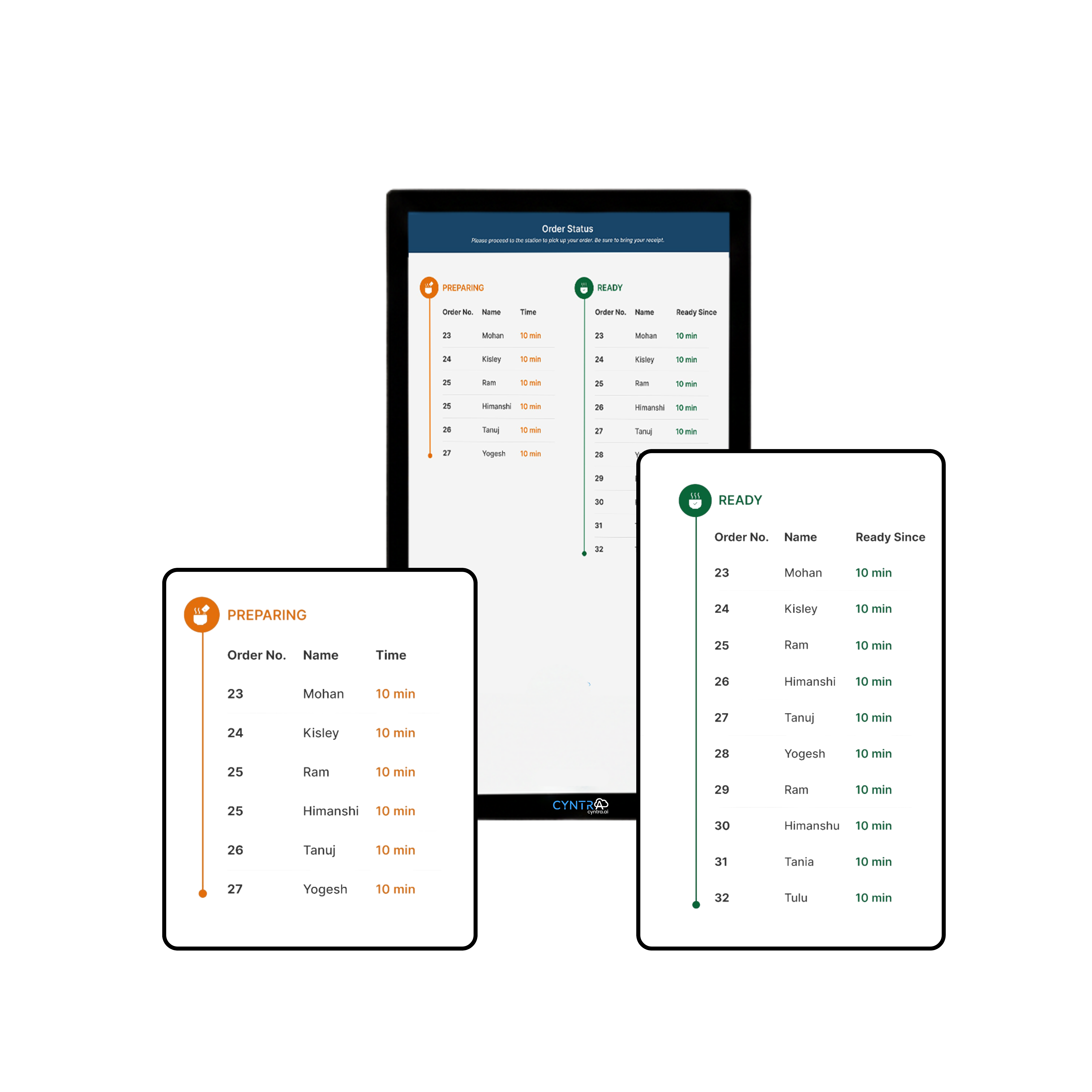
An Order Status Board That Keeps Customers Calm & Informed
Cyntra's Customer Display System (CDS) is a dedicated in-store screen that shows guests exactly where their order stands — right from placement all the way to collection. Deeply integrated with both the KDS and POS, every status change in the kitchen is instantly reflected on the customer-facing display, eliminating the need to ask staff "is my order ready?"
Live Order Status
Customers see their order move through each stage — Received, Preparing, Ready, Collected — in real time on a clear, easy-to-read in-store display.
Multi-Order View
Display multiple orders simultaneously with colour-coded status lanes so all waiting customers can track their own order at a glance without crowding the counter.
KDS & POS Integration
Fully integrated with Cyntra KDS and POS — every status change the kitchen makes on the KDS is instantly mirrored on the CDS, with no manual updates required.
Ready Alert & Order Call
When an order is marked ready in the kitchen, the CDS highlights it prominently and triggers an optional audio chime — reducing noise and staff announcements at the counter.
Branded Display
Customise the layout, colours, logo, and fonts to match your brand identity, giving every customer a consistent and professional in-store experience.
Any Screen, Any Size
Deploy on any commercial display — wall-mounted TVs, counter tablets, or dedicated kiosk screens — with a responsive interface that auto-fits to screen dimensions.
One Screen, Four Stages — The Full Order Journey
The moment a customer places an order at the counter or through a kiosk, it instantly appears on the CDS as Received. As the kitchen begins work, it transitions to Preparing. When it's plated and ready, the display calls it out as Ready for Collection — highlighted in green with an optional audio alert. Once the customer picks it up, it's marked Collected and cleared from the board. No staff announcements, no guesswork, no queuing at the counter.


Deeply Integrated with KDS & POS — Zero Extra Steps
CDS is not a standalone screen — it's a live extension of your kitchen and ordering workflow. When a chef marks an order as ready on the Cyntra KDS, the CDS updates automatically. When the cashier processes a new order on the POS, it appears on the CDS instantly. No separate logins, no manual status changes, no delays. Everything is synchronised in real time across your entire operation.
Accelerate Your Business Growth
Our innovative technology solutions are tailored to meet the unique needs of businesses of all sizes.
FAQs
What is a Customer Display System (CDS)?
How is CDS different from a POS extended display?
How does CDS integrate with the KDS?
Can CDS display multiple orders at once?
Does CDS notify customers when their order is ready?
What hardware is needed to run CDS?
I'm ready for a free, live demo
Streamline Your Business With Our Complete Suite of Applications
Elevate the experience of your customers with our comprehensive suite of cutting-edge features. Seamlessly integrate efficient checkouts, streamlined ordering processes, and robust inventory.